Blog

Latest News and Updates

Vision Helpdesk V2.8.2 Stable Released

Today we have released Vision Helpdesk V2.8.2 Stable Release — This is mainly a bug fix release includes fixing of some important bugs in V2.7.4 and some new features in existing modules.

Its recommended to upgrade as it will fix below listed bugs in your installation.

Features in V2.8.2 Stable

  • Login Integration for Drupal and Php-Nuke
  • Direct URL Login for Clients
  • Login as Client for Staff
  • User Registration Approval System
  • Admin can create alerts for their staffs
  • Option to setup Alerts for escalation rules
  • Login Integration for WordPress 2.5 and above versions
  • Department restriction for clients
  • Setting to send ticket details in ticket reply email

Bug fixes in V2.8.2

  • HTML editor for Predefined Replies
  • Incorrect path for when a file is included from web in Knowledgebase articles.
  • Too many space between lines in outlook ticket
  • Signature formating issues
  • Quote reply does not work
  • Reset due time on escalation
  • Duplicate entry in client report
  • Incorrect format email on HTML editor disable

Change Log

You can find the list of files that were edited during version change V2.7.4 to V2.8.1 beta

http://thevisionworld.com/forums/index.php/topic,298.0.html

You can find the list of files that were edited during version change V2.7.4 to V2.8.1 beta

http://thevisionworld.com/forums/index.php/topic,299.0.html

How to Upgrade to Vision Helpdesk V2.8.2 Stable?

Auto Update

Vision Helpdesk offers Auto upgrades from Admin Panel Click on >> Software Information >> Available Updates will shows updates available for upgrade.

Note : While upgrading it will ask you ftp path –by default it takes complete path to your manage folder which needs to be changed to — ftp path.

Example : A client having path — /home/username/public_html/support/manage/

This path should be changed to — /public_html/support/manage/

(In above example we assume ftp access is given from public_html folder and its sub folders.)

Manual Upgrade :

Step1) Login to http://secure.visionhelpdesk.com

Step 2) From Product and Services >> View Details >> Download zip – Update from 2.7.4 to 2.8.2

Step 3) Unzip above file and upload it to your installation — that is overwrite files on your installation —make sure if you ftp files then it should be in binary format.

Step 4) Run http://yourdomain.com/support/manage/upgrade.php in browser that will update to V2.8.2

That’s it.

Note : For Clients who have done customization – its requested to check with our support team before they upgrade.

read more..
Vision HelpdeskVision Helpdesk V2.8.2 Stable Released

Vision Helpdesk V2.7.4 Stable Released

Today we have released Vision Helpdesk V2.7.4 Stable Release — This is mainly a bug fix release includes fixing of some important bugs in V2.7.2.

Its recommended to upgrade as it will fix below listed bugs in your installation.

Bug fixes in V2.7.2

  • Reset due time on escalation
  • Duplicate entry in client report
  • Multiple email address  in To field
  • Unformatted email on HTML editor disable
  • IMAP looping  issue.
  • Plain email in Auto Responder.

Change Log

You can find the list of files that were edited during version change V2.7.2 to V2.7.4

http://thevisionworld.com/forums/index.php/topic,292.0.html

How to Upgrade to V2.7.4?

Auto Update

Vision Helpdesk offers Auto upgrades from Admin Panel Click on >> Software Information >> Available Updates will shows updates available for upgrade.

Note : While upgrading it will ask you ftp path –by default it takes complete path to your manage folder which needs to be changed to — ftp path.

Example : A client having path — /home/username/public_html/support/manage/

This path should be changed to — /public_html/support/manage/

(In above example we assume ftp access is given from public_html folder and its sub folders.)

Manual Upgrade :

Step1) Login to http://secure.visionhelpdesk.com

Step 2) From Product and Services >> View Details >> Download zip – Update from 2.7.2 to 2.7.4

Step 3) Unzip above file and upload it to your installation — that is overwrite files on your installation —make sure if you ftp files then it should be in binary format.

Step 4) Run http://yourdomain.com/support/manage/upgrade.php in browser that will update to V2.7.4

That’s it.

read more..
Vision HelpdeskVision Helpdesk V2.7.4 Stable Released

Vision Helpdesk V2.7.2 Stable Released

Today we have released Vision Helpdesk V2.7.2 Stable Release — this includes fixing of some important bugs in V2.6.4 and some new exciting features added.

Its recommended to upgrade as it will fix below listed bugs in your installation.

Features added in V2.7.2

Bug fixes in V2.6.4

  • Alert Email shows html garbage
  • Left Panel Search  if moved to blank it displays incorrect domains or multiple domains
  • Single quote issue for department
  • Whmcs invoice not creating
  • Email Templates Forget Password should be Forgot Password
  • Domain or Department sorting in New Ticket creation
  • Cyrillic character support
  • Custom Fields even if set to required does not work – clients can still skip those fields and  sent ticket  — Check on both whmcs integartion and on client portal and staff ticket creation.
  • WHMCS Integration error.
  • WYSIWYG Editor Incorrect Formating.
  • Ticket Auto Close does not close tickets.
  • Long subject gets cliped through email.
  • Base64 encoded emails not decoding.

Change Log

You can find the list of files that were edited during version change V2.6.4 to V2.7.2

http://thevisionworld.com/forums/index.php/topic,286.0.html

How to Upgrade to V2.7.2?

Auto Update

Vision Helpdesk offers Auto upgrades from Admin Panel   Click on >> Software Information >> Available Updates will shows updates available for upgrade.

Note : While upgrading it will ask you ftp path –by default it takes complete path to your manage folder which needs to be changed to — ftp path.

Example : A client having path — /home/username/public_html/support/manage/

This path should be changed to — /public_html/support/manage/

(In above example we assume ftp access is given from public_html folder and its sub folders.)

Manual Upgrade :

Step1)  Login to http://secure.visionhelpdesk.com

Step 2) From Product and Services >> View Details >> Download zip – Update from 2.6.4 to 2.7.2

Step 3) Unzip above file and upload it to your installation — that is overwrite files on your installation —make sure if you ftp files then it should be in binary format.

Step 4)  Run http://yourdomain.com/support/manage/upgrade.php in browser that will update to V2.7.2

That’s it..

read more..
Vision HelpdeskVision Helpdesk V2.7.2 Stable Released

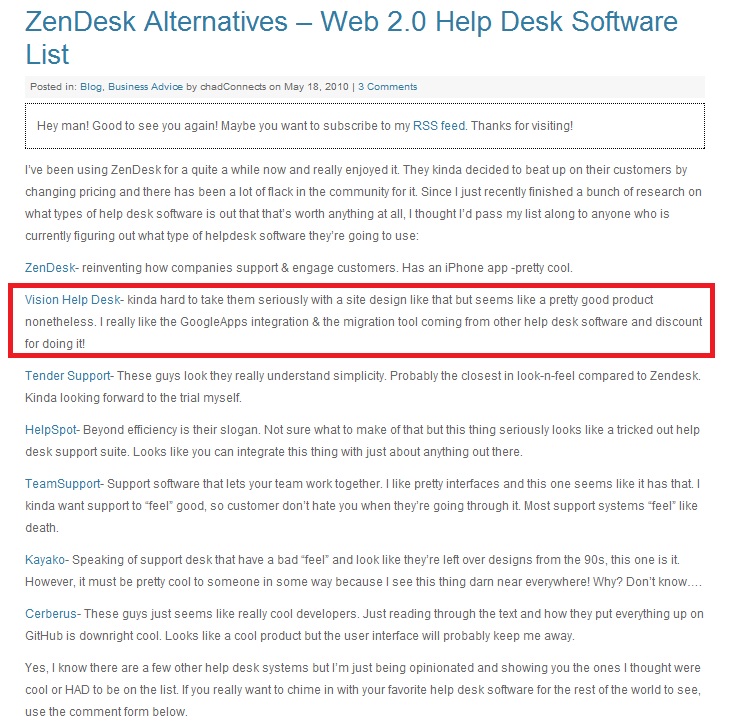
ChadConnects recommends Vision Helpdesk as an Alternative to Zendesk

Vision Helpdesk Tops on Web 2.0 Helpdesk Software List published by ChadConnects.com – an SEO Company.

We take every comment seriously — YES we do agree our old website design was not compatible with IE Browser, we redesigned our website and now I hope ChadConnects and everyone else like our site design 🙂

Zendesk Alternative Vision Helpdesk

Vision Helpdesk Review

For more details check this — http://www.chadconnects.com/web-2-0-helpdesk-software-list/

Also check out Helpdesk Pricing Comparison between Vision Helpdesk Vs Cerberus Vs Kayako Vs Zendesk Vs  Autotask Vs Tender Helpdesk Vs Active Campaign.

read more..
Vision HelpdeskChadConnects recommends Vision Helpdesk as an Alternative to Zendesk

Helpdesk Pricing Comparison, Vision Helpdesk turns out to be most economical

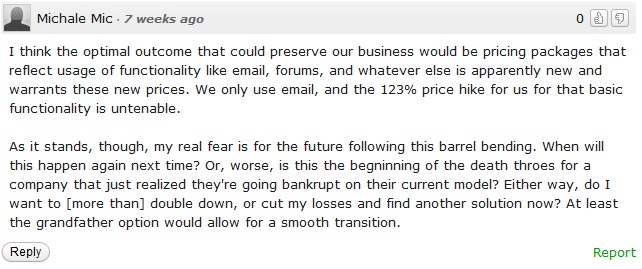
Recently I stumble upon  TechCrunch article that reads — “Zendesk Raises Prices, Pisses Off Customers

I was wondering, how a company could ever think of raising price for just adding few features?  Not at all a good business practice.  The article also mentions that Zendesk later realized their mistake and they decided to run the same pricing for existing customers where as new customers will be still paying higher cost.

Vision Helpdesk could never think of raising price for adding features – Just like we have released Vision Helpdesk Mobile App and that is completely FREE!!

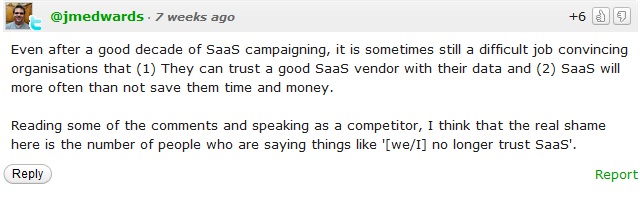
The article has also raised questions about the SaaS methods and What SaaS should practically be doing is reducing overall help desk management cost ? Isn’t it?  With Zendesk becoming overpricy  that doesn’t seem so 🙁

Some random comments from post —

Kayako comment on Zendesk SaaS

ZenDesk Shame

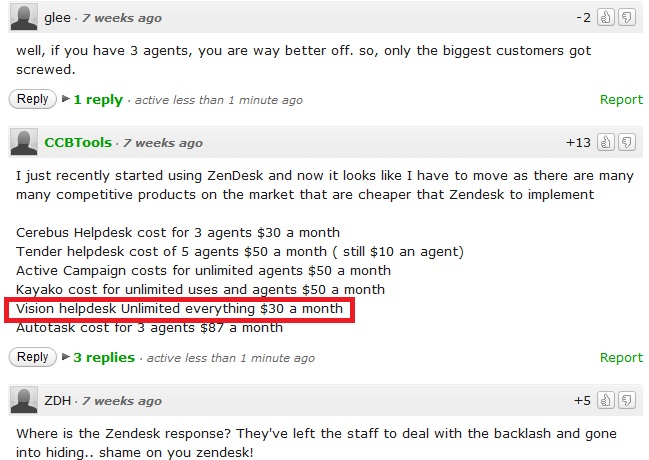
Interestingly, the article has received several comments, One that mentions the comparison  of pricing between several paid helpdesk softwares (screenshot below ) shows Vision Helpdesk is the only Economical Helpdesk Software that offers EVERYTHING UNLIMITED at just $30 per month. (On Top of it we offer FREE WHMCS Software worth $15 per month 😉

Helpdesk Price Comparison

We appreciate CCBTools who have posted the nice pricing comparison.

Vision Helpdesk is open for Zendesk Refugee Discounts – please contact us on our Live Chat or email us for Zendesk Refugee Discounts.

read more..
Vision HelpdeskHelpdesk Pricing Comparison, Vision Helpdesk turns out to be most economical